SQL GROUP BY and Aggregation: Complete Guide with Examples
Master SQL GROUP BY and aggregation functions — COUNT, SUM, AVG, MIN, MAX, HAVING, and ROLLUP with real query examples and common pitfalls explained.
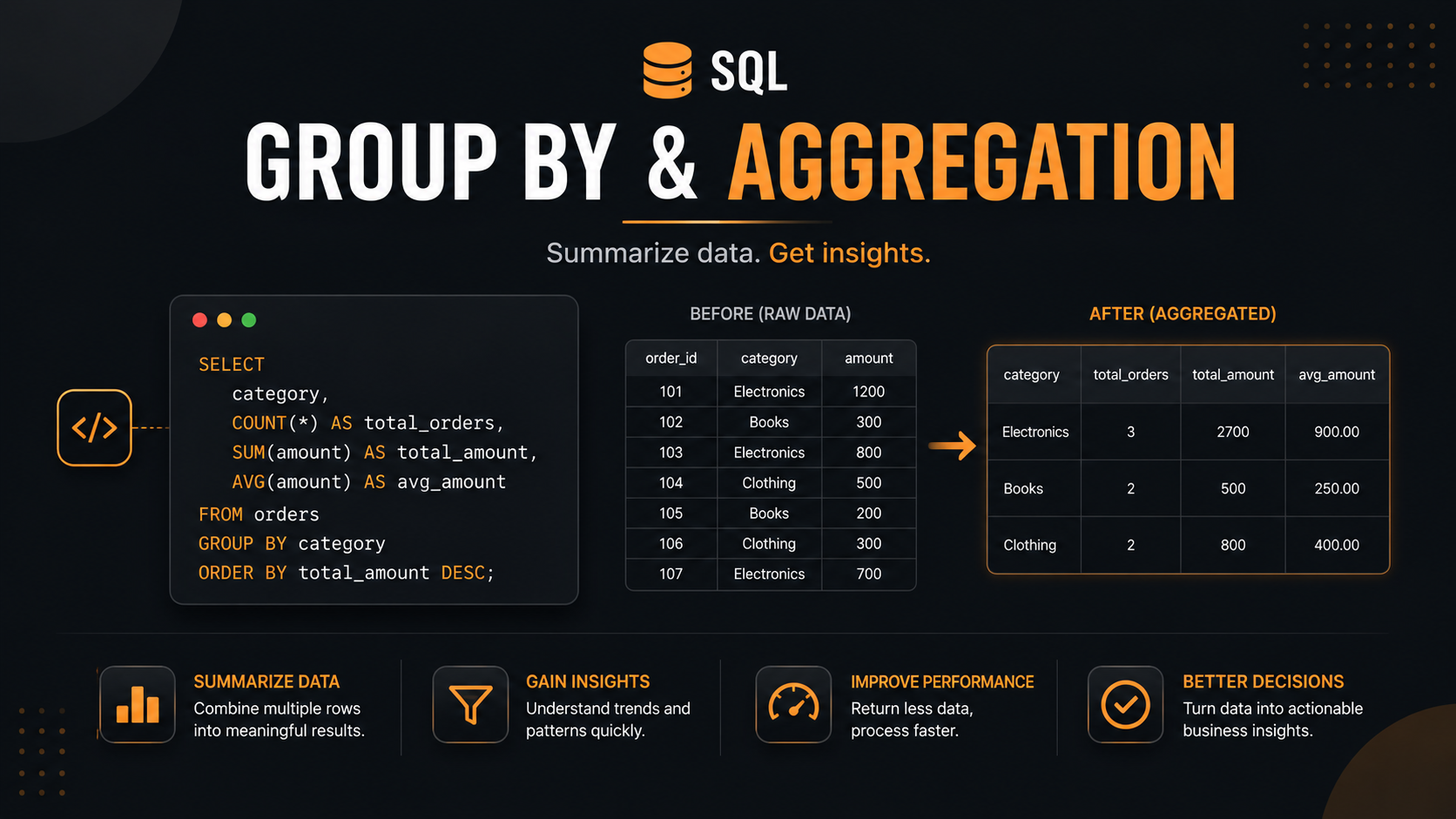
GROUP BY & Aggregate Functions — Explained Like You’re 10 🎯
Let’s forget SQL for a minute and imagine you’re a shopkeeper with a notebook full of sales. That’s the best way to understand this.
🛒 The Story: Imagine a Fruit Shop
You sold fruits all day and wrote each sale in your notebook:
| Sale # | Fruit | Customer | Quantity | Price (₹) |
|---|---|---|---|---|
| 1 | Apple | Ravi | 2 | 100 |
| 2 | Banana | Priya | 6 | 60 |
| 3 | Apple | Sita | 3 | 150 |
| 4 | Mango | Ravi | 1 | 80 |
| 5 | Banana | Ravi | 4 | 40 |
| 6 | Apple | Priya | 5 | 250 |
| 7 | Mango | Sita | 2 | 160 |
At the end of the day, your dad asks:
“How much of each fruit did we sell today?”
You can’t just stare at 7 rows. You need to group similar things together and then calculate something (sum, count, average, etc.).
That’s exactly what GROUP BY + Aggregate Functions do!
🧠 Part 1: What is GROUP BY?
GROUP BY = “Put similar things in the same bucket.”
It’s like sorting your laundry:
- 👕 All shirts in one pile
- 👖 All pants in another
- 🧦 All socks in another
In our fruit shop, GROUP BY Fruit means:
🍎 Apple bucket → Sales 1, 3, 6 🍌 Banana bucket → Sales 2, 5 🥭 Mango bucket → Sales 4, 7
But wait — just grouping doesn’t give an answer yet. You need to do something with each bucket. That’s where aggregate functions come in.
🧮 Part 2: What are Aggregate Functions?
Aggregate functions = “A calculation done on the whole bucket.”
They take many values and squish them into ONE answer.
The Famous 5 Aggregate Functions
| Function | What it does | Layman Meaning |
|---|---|---|
| SUM() | Adds everything up | “Total” |
| COUNT() | Counts how many | “How many?” |
| AVG() | Average | “On average…” |
| MAX() | Largest value | “Biggest” |
| MIN() | Smallest value | “Smallest” |
🎬 Part 3: GROUP BY + Aggregate in Action
Question 1: “How much money did each fruit make?”
Step 1 — Group by Fruit:
1
2
3
🍎 Apple bucket  → ₹100, ₹150, ₹250
🍌 Banana bucket → ₹60, ₹40
🥭 Mango bucket  → ₹80, ₹160
Step 2 — Apply SUM() on Price:
1
2
3
🍎 Apple  → ₹500
🍌 Banana → ₹100
🥭 Mango  → ₹240
SQL:
1
2
3
SELECT Fruit, SUM(Price) AS Total_Sales
FROM Sales
GROUP BY Fruit;
Result: | Fruit | Total_Sales | |——–|————-| | Apple | 500 | | Banana | 100 | | Mango | 240 |
🎉 7 rows became 3 rows. That’s the magic!
Question 2: “How many sales did each customer make?”
Step 1 — Group by Customer:
1
2
3
Ravi  → Sale 1, 4, 5
Priya → Sale 2, 6
Sita  → Sale 3, 7
Step 2 — Apply COUNT():
1
2
3
Ravi  → 3 sales
Priya → 2 sales
Sita  → 2 sales
SQL:
1
2
3
SELECT Customer, COUNT(*) AS Number_Of_Sales
FROM Sales
GROUP BY Customer;
Question 3: “What’s the average price each customer paid?”
SQL:
1
2
3
SELECT Customer, AVG(Price) AS Avg_Spent
FROM Sales
GROUP BY Customer;
🧩 Part 4: The Golden Rule (Don’t Forget!)
👉 Whatever column you put in SELECT must either:
- Be in the GROUP BY clause, OR
- Be inside an aggregate function.
❌ Wrong:
1
2
3
SELECT Fruit, Customer, SUM(Price)
FROM Sales
GROUP BY Fruit;   -- Customer is NOT grouped or aggregated → ERROR!
✅ Right:
1
2
3
SELECT Fruit, Customer, SUM(Price)
FROM Sales
GROUP BY Fruit, Customer;
🧠 Memory trick: “If it’s in SELECT, it must be in GROUP BY or wrapped in an aggregate function.”
🎚️ Part 5: GROUP BY Multiple Columns
What if you want: “How much did each customer spend on each fruit?”
You need 2 levels of buckets — group by Customer AND Fruit:
1
2
3
SELECT Customer, Fruit, SUM(Price) AS Total
FROM Sales
GROUP BY Customer, Fruit;
Result: | Customer | Fruit | Total | |———-|——–|——-| | Ravi | Apple | 100 | | Ravi | Mango | 80 | | Ravi | Banana | 40 | | Priya | Banana | 60 | | Priya | Apple | 250 | | Sita | Apple | 150 | | Sita | Mango | 160 |
Think of it as buckets inside buckets 🪣🪣
🚪 Part 6: WHERE vs HAVING (The Most Confusing Part!)
This trips up EVERYONE. Let’s nail it:
WHERE → Filter BEFORE grouping (filters individual rows)
HAVING → Filter AFTER grouping (filters groups)
Analogy: Imagine a school assembly:
- WHERE = Bouncer at the door — “Only students with uniforms can enter.” (filters people before they form groups)
- HAVING = Teacher checking class strength — “Only classes with more than 30 students get a prize.” (filters groups after they’re formed)
Example:
“Show fruits with total sales > ₹200, considering only sales above ₹50.”
1
2
3
4
5
SELECT Fruit, SUM(Price) AS Total
FROM Sales
WHERE Price > 50          -- filters individual rows first
GROUP BY Fruit
HAVING SUM(Price) > 200;  -- filters groups after aggregation
🧠 Memory trick:
WHERE works on rows. HAVING works on groups. WHERE comes before GROUP BY. HAVING comes after.
📜 Part 7: SQL Order of Execution (Super Important!)
Even though you write SQL in this order:
1
SELECT → FROM → WHERE → GROUP BY → HAVING → ORDER BY
The database actually executes it in this order:
1
2
3
4
5
6
1. FROM       → Get the table
2. WHERE      → Filter rows
3. GROUP BY   → Form buckets
4. HAVING     → Filter buckets
5. SELECT     → Pick columns
6. ORDER BY   → Sort the result
🧠 Memory trick: “FWGHSO” → From, Where, GroupBy, Having, Select, OrderBy.
🎁 Part 8: Cool Tricks & Gotchas
1. COUNT(*) vs COUNT(column)
COUNT(*)→ counts all rows (including NULLs)COUNT(column)→ counts only non-NULL valuesCOUNT(DISTINCT column)→ counts unique values
2. NULL values are ignored by aggregates
AVG(salary) ignores NULL salaries. So averages may surprise you!
3. GROUP BY without aggregate = same as DISTINCT
1
2
3
SELECT Fruit FROM Sales GROUP BY Fruit;
-- same as
SELECT DISTINCT Fruit FROM Sales;
4. You can use expressions in GROUP BY
1
2
3
SELECT YEAR(SaleDate), SUM(Price)
FROM Sales
GROUP BY YEAR(SaleDate);
💼 Interview Tips on GROUP BY
🎤 Common questions you’ll be asked:
“Difference between WHERE and HAVING?” → WHERE filters rows before grouping; HAVING filters groups after grouping.
- “Can we use HAVING without GROUP BY?” → Yes! It treats the whole table as one group.
1
SELECT SUM(Price) FROM Sales HAVING SUM(Price) > 1000;
*“What’s the difference between COUNT(), COUNT(1), and COUNT(column)?”** → COUNT(*) and COUNT(1) → count all rows. COUNT(column) → ignores NULLs.
“Can you use aggregate in WHERE?” → ❌ No! Aggregates can’t be in WHERE because grouping hasn’t happened yet. Use HAVING.
“Order of execution of SQL clauses?” → FROM → WHERE → GROUP BY → HAVING → SELECT → ORDER BY → LIMIT.
- “Find the 2nd highest salary per department” → Classic GROUP BY + window function question.
🏆 The 30-Second Summary
GROUP BY = Put similar rows into buckets. Aggregate functions = Do math on each bucket (SUM, COUNT, AVG, MIN, MAX). WHERE filters rows before grouping; HAVING filters buckets after grouping. Rule: Every column in SELECT must be in GROUP BY or inside an aggregate.